
Table of Contents
Introduction
I know it’s frustrating when your Honeywell thermostat is not working, but that’s exactly why I’m here to help you fix the problem easily.
Many homeowners face this issue at some point. Sometimes the thermostat screen goes blank, the temperature displayed is incorrect, or the heating and cooling system stops responding completely.
The good news is that most Honeywell thermostat problems can be solved at home without calling a technician. In many cases, the issue is caused by dead batteries, incorrect settings, power problems, or a temporary system glitch.
In this guide, I’ll show you several simple troubleshooting steps that can help get your Honeywell thermostat working properly again.
Why This Happens
There are several reasons why a Honeywell thermostat may stop working.
Common causes include:
- Dead batteries.
- Tripped circuit breakers.
- Incorrect thermostat settings.
- Loose wiring.
- Temporary software problems.
- Dirty components.
- HVAC system issues.
Many users immediately think the thermostat itself is broken, but the actual problem is often much simpler.
Step-by-Step Solution
Step 1: Replace the Batteries
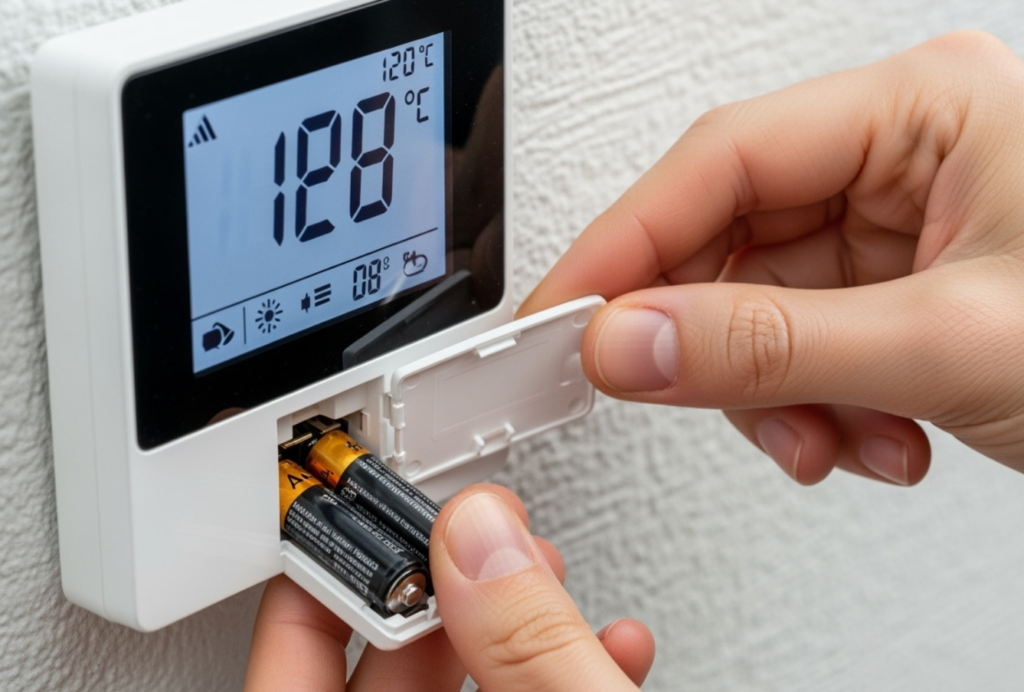
One of the most common causes of thermostat problems is weak batteries.
Remove the thermostat cover and replace the old batteries with fresh ones.
After installing new batteries, wait a few seconds and check whether the screen turns back on.
Step 2: Check the Thermostat Settings
Sometimes the thermostat is accidentally set to the wrong mode.
Verify that:
- Heat mode is selected during winter.
- Cool mode is selected during summer.
- The temperature setting is correct.
Incorrect settings can make it appear that the thermostat is not working even though the device itself is fine.
Step 3: Restart the thermostat.
Temporary glitches can cause the thermostat to stop responding.
Remove the batteries for a few minutes and then reinstall them.
Some Honeywell models also include a reset option inside the settings menu.
Step 4: Inspect the Circuit Breaker
If the thermostat screen is completely blank, a power issue may be responsible.
Go to your home’s electrical panel and check whether the breaker connected to your HVAC system has tripped.
Reset the breaker if necessary.
Step 5: Check the Air Filter
A dirty air filter can sometimes affect heating and cooling performance.
If the filter is clogged, replace it with a clean one.
Many homeowners overlook this simple step.
Step 6: Inspect the Wiring
Loose wires can prevent the thermostat from communicating with the HVAC system.
Turn off the power before inspecting any wiring.
If you notice damaged wires or feel uncomfortable handling electrical components, contact a professional technician.
Step 7: Reset the Thermostat
If nothing else works, performing a factory reset may solve the problem.
Different Honeywell models have different reset procedures, so follow the instructions for your specific model.
Additional Solutions
Update Smart Thermostat Settings
If you use a Wi-Fi Honeywell thermostat, reconnect it to your network and verify that the app settings are correct.
Check Your HVAC System
Sometimes the problem is not the thermostat itself.
A faulty furnace, air conditioner, or heat pump can create symptoms that look like a thermostat failure.
Contact a Technician
If all troubleshooting steps fail, professional diagnosis may be necessary.
Common Mistakes to Avoid
- Forgetting to replace old batteries.
- Using incorrect thermostat modes.
- Ignoring a dirty air filter.
- Resetting the thermostat without checking basic settings first.
- Assuming the thermostat is broken immediately.
- Attempting electrical repairs without turning off power.
Frequently Asked Questions
Why is my Honeywell thermostat not working?
The problem may be caused by dead batteries, incorrect settings, power issues, or HVAC problems.
How do I reset my Honeywell thermostat?
Reset instructions vary depending on the model. Most modern models include a reset option inside the settings menu.
Do I need technical skills to fix this problem?
No. Most troubleshooting steps are simple and safe for homeowners.
Can this problem happen again?
Yes. Regular maintenance and battery replacement can help prevent future issues.
Is it safe to inspect thermostat wiring?
Yes, but always turn off the power first. If you are unsure, contact a qualified technician.
Conclusion
A Honeywell thermostat that stops working does not always mean you need a replacement. In many cases, the problem can be fixed with simple troubleshooting steps like replacing batteries, checking settings, or resetting the device.
By following these steps one by one, most homeowners can solve the issue themselves and restore normal heating or cooling.
Once you follow these steps, the problem should be fixed.